
By Grant Mercer September 10, 2026
Judge mobile apps for field service on one thing: can the technician finish the job on the phone, offline, without re-entering any of it later?
The phone is where the job actually gets closed
The office system is a reporting tool. Every billable minute, every part pulled off the truck, every before-and-after photo and every customer signature originates on a phone in someone’s hand, standing in a crawlspace or a mechanical room. Whatever the back office shows you at the end of the week is a copy of what the technician entered on site, or a reconstruction of it. Reconstructions cost money.
Here’s the test we give contractors evaluating software. If a technician has to re-enter anything at the shop, or sit in the truck at six o’clock catching up on paperwork, the app failed. Not the technician. The app. Double entry is where hours go missing, where a $40 part never makes it onto the invoice, and where a job stays open for eleven days because nobody closed it out.
Three behaviors decide whether the rest of the feature list means anything:
- It works with no signal in a basement or a rural service area, and syncs cleanly when the phone finds a tower again, without duplicate records.
- It captures proof at the moment of work: photos, meter readings, parts used, signature.
- It shows the technician the next job and the address without a phone call to dispatch.
Adoption is the metric that decides everything else. An app technicians work around produces worse data than a paper ticket, because paper at least gets handed to someone. The failure mode has a shape you’ll recognize: dispatch starts keeping a parallel spreadsheet of real job status, because they’ve learned the app’s status field lies. Once that spreadsheet exists, you’re paying for software and running the business on a shared sheet. Getting the field service workflow from call to completion right starts with what the technician can actually finish on the phone.
What mobile apps for field service have to do on site
Feature lists are written by marketing. What matters is whether a technician standing in a crawl space with one bar of signal can finish the job and leave with the invoice sent. Test each capability below against the middle column, then verify it yourself using the right-hand column. If you want a starting shortlist, see Top Mobile Apps Every Field Service Technician Should Use in 2025.
| Capability | What good looks like on a job site | How you verify it |
|---|---|---|
| Offline job access | Full job packet cached; edits queue and sync when signal returns | Airplane mode, complete a job, re-enable data, confirm nothing was lost |
| Conflict handling | Two edits to one work order produce a warning and both versions, never a silent overwrite | Edit the same order on two phones offline, then sync both |
| Photo and video | Media attaches to the specific line item, not the camera roll | Shoot three photos on one line, open the order on a desktop |
| Signature and completion record | Customer signs and the emailed record leaves before the truck does | Sign on the phone, check the inbox in under a minute |
| Time and labor | Start/stop clock with travel logged separately from wrench time | Run a short job, read the two totals on the timecard |
| Parts and truck stock | Parts consumed decrement van inventory and flow straight to the invoice | Add a part, check the invoice draft and the stock count |
| Asset history | Serial number, prior repairs and warranty status by address | Open a repeat address and look for last visit’s notes |
| Payment capture | Card data stays inside the terminal or payment SDK and returns a token; the phone never stores a number | Ask the vendor which SDK tokenizes and where the token lands |
| Battery and data | Eight hours of use without a car charger | Run a full day on one phone before rollout |
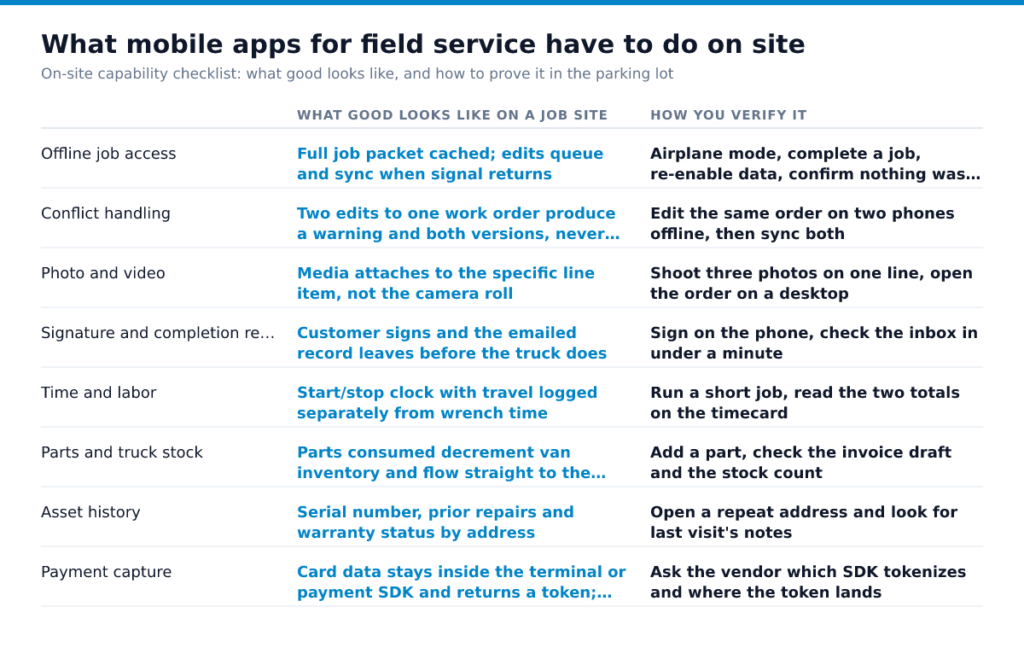
The sync gap is where most of this breaks. An app that reads offline but won’t write offline sends your technician back to the truck to retype everything, and that retyping is where parts get dropped and hours get rounded to memory.
Your app is now your wage-and-hour record
The moment a technician taps “clock in” on a phone, that app stops being a scheduling tool and becomes the employer’s payroll record. Federal rules don’t care whether the punches live in a filing cabinet or a vendor’s database. Covered employers have to keep, for each employee, the hours worked each workday and the total hours worked each workweek, along with identifying information and the pay-rate items the rule spells out (29 CFR 516.2). The basic time cards or sheets showing daily starting and stopping times have to be preserved at least two years from the date of last entry (29 CFR 516.6).
So ask the vendor a plain question during evaluation: can you export raw punch data yourself, including every edit and the user who made it, without opening a support ticket? A rounded weekly summary in a PDF is not a record you want to hand an investigator. The same export feeds your job-costing and the Service-Level Agreement Metrics That Improve First-Time Fix Rates you report on, so it earns its keep twice.
GPS breadcrumbs and geofenced clock-in cut buddy punching and travel-time disputes.
A 20-minute field test that beats any demo
Run this on a Tuesday afternoon, before the sales rep calls back, and run it yourself with one technician you trust. A demo runs on a new phone, on office wifi, with a rehearsed job. Your crews run on cracked screens in a crawlspace with one bar. Twenty minutes of honest testing tells you more than an hour of screen-sharing, and it costs you nothing but a trial signup. Do all seven steps in order, because the failures compound: an app that syncs badly also duplicates badly, and an app with too many taps gets skipped by the tech who’s already behind.
- Install the trial on the oldest phone in your fleet, not a loaner and not the rep’s device.
- Switch on airplane mode, then close a full job: photos, parts used, notes, and a customer signature.
- Reconnect and check what actually arrived, what duplicated, and how many seconds it took.
- Have a dispatcher reassign that job mid-visit and time how fast the tech’s screen changes.
- Run one payroll week of punches, export it, and reconcile it line by line against a paper timesheet, since the hours worked each workday are what you’re required to keep (DOL Wage & Hour Division, 29 CFR 516.2(a)(7) (eCFR current)).
- Count the taps to close a routine service call; past roughly a dozen, technicians will shortcut it.
- Cancel the trial and note how hard that was, because that’s your offboarding and data-export preview.
Done looks like a job that survived airplane mode intact, a reassignment the tech saw before he knocked on the wrong door, and a payroll export that matched paper without a spreadsheet rescue. If step 4 drags, the problem may be your dispatch process rather than the app, and 5 Ways to Reduce Dispatch Time in Your Service Business and Real-Time Dispatching Tips for Busy Field Service Teams are where to look next.
What you pay for, and what you’re actually buying
Per-technician pricing reads cheap until you count everyone who needs a login. Dispatchers, the office manager who invoices, the owner who checks jobs at night, the seasonal helper you hire in June. Ask how each of those seats is billed, and whether a seat you deactivate in October still bills in November.
Then ask which features sit behind a tier.
Read the termination and data-export terms before the rate. In month 14, what you’ll care about is whether your job history leaves in a usable file. Where in-app payments are bundled, get the pricing structure in writing along with the batch cut-off time; funding speed and the cost of acceptance are separate questions with separate answers.
A narrow app plus disciplined process beats a broad one nobody fills in, which is the argument in Field Service Management on a Budget: Features That Actually Matter and in How Small Plumbing Companies Can Handle More Jobs Without Hiring.
Before your next demo, email the vendor three questions in writing: total seats billed, the export format on cancellation, and the notice period. Keep the reply.
Frequently Asked Questions
Is there a mobile app for Dynamics 365 Field Service?
Yes. Check the mobile behavior on the phones your techs actually carry, especially offline edits, parts entry, camera use, and what happens when two people touch the same work order before sync.
What is the best app for field work?
The best app for field work is the one your technicians can finish a real job in without calling the office, and your back office can trust without retyping anything. For quoted installs, that usually means estimates, approvals, parts, and invoices stay tied to one work order from start to finish. For emergency service, it means the app opens fast, survives weak signal, and takes payment before the truck leaves.
Can technicians use a free field service app instead of paid software?
A free field service app works for a one-truck shop, and it stops working once you need records you can defend. Federal wage-and-hour rules require employers to keep core pay records, including hours worked each workday and total hours each workweek (29 CFR 516.2), and to preserve supporting records such as time cards, work schedules, and the records that explain wage calculations for the required retention period (29 CFR 516.6). If the free tier removes exports, edit history, user permissions, or record retention controls, the cost shows up later in payroll cleanup, disputes, and rekeying.